


Gallerie Wallpapers
4.286.00 Reviews
App Specs
- Version
- 2.0.5
- Updated On
- License
- Free
- Downloads
- 1,000,000+
- Developer
- Sibelius Studios LLC
- Categories
- Personalization
- Platform
- Android
Screenshots
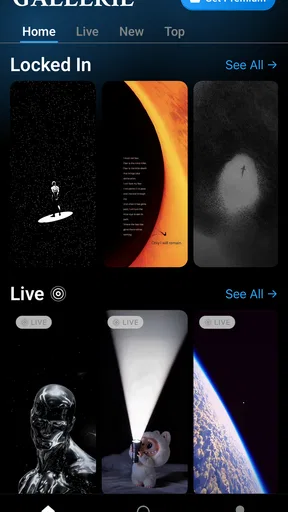

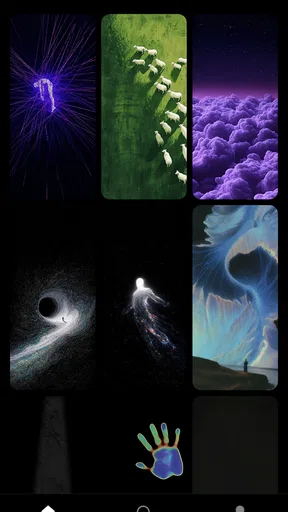

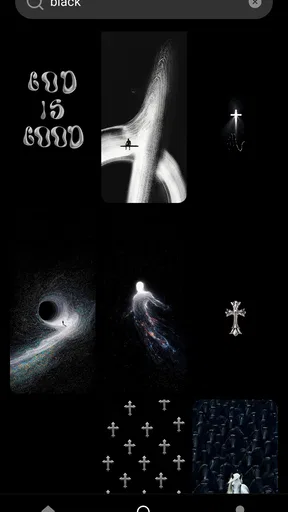
 Analysis by AppCompare
I like wallpaper apps best when choosing an image feels easier than searching the entire web, and Gallerie Wallpapers makes that idea its main appeal. It is a free personalization app from Sibelius Studios LLC, built around a curated selection rather than the promise of endless results. That focus can save time if you want a strong new look for your phone without sorting through piles of blurry, repetitive, or poorly cropped pictures. My overall view is positive, with one important caveat: a carefully filtered gallery is useful only if its selection suits your taste.
That distinction matters more than it might seem. A wallpaper is something you see dozens of times a day, so convenience is helpful, but it cannot compensate for a style that feels wrong on your device. I would approach this as a shortcut to discovery, not as a promise that every image will match my preferences. The app is at its best when I am open to suggestions and want a quicker route to a background I will enjoy living with.
A curated gallery, with a trade-off
I find that a curated wallpaper gallery is most useful when I want a quick change but don’t have a precise image in mind. In this section, I’ll look at how that narrower approach can make browsing less of a chore, while also explaining why it may leave people with specific tastes wanting more.
Why the filtering matters
Wallpaper browsing often turns into a chore. Search results may include near-duplicates, images that look better on a large monitor than on a phone, or designs that lose their impact once icons cover them. Gallerie Wallpapers approaches that problem by narrowing the field. Rather than asking you to sift through everything, it aims to present images worth considering in the first place.
That changes how I would use it. I would open the app when I wanted a quick refresh, browse with a particular mood in mind, and save the most promising options before deciding which one to keep. A smaller, more considered gallery can make that choice feel less like catalog management and more like picking a visual accent for the device I use every day.
The appeal is especially clear for people who do not want to learn image-editing tools or spend time checking whether a download will look acceptable on a phone. The app’s central promise is curation, not a complicated customization workflow. If your usual wallpaper search ends with too many tabs and a handful of disappointing downloads, this is a more focused starting point.
There is a useful trade-off here between browsing effort and choice. A broad search gives me more control over what I look for, but also asks me to evaluate the results myself. A curated gallery can shorten that process, though the more I rely on its selection, the more I am trusting its taste to overlap with mine. I would not expect curation to remove every poor fit; I would expect it to make the first round of browsing less exhausting.
Worth Reading Before You Choose

Flipboard Shows What News Apps Must Do Beyond the Feed

Switching to Android Auto Means Rethinking Your Driving Routine

Google Calendar Makes a Crowded Week Easier to Manage

Ludo King Makes the Most of the Minutes Between Plans

Baby Panda World Brings Quick Play to Modern Phones, but Its Game Library Feels Busy

ESPN’s Live Game View Makes Following Close Games Easier
What a good wallpaper needs to do
A striking image is not automatically a practical home-screen background. Icons, widgets, and text can obscure the most interesting part of a picture, while a busy composition may make the screen feel cluttered. When browsing, I recommend judging each option with the actual phone layout in mind: look for a subject that leaves room for icons, and notice whether strong contrast might make labels harder to read.
This is a useful way to get more from a curated collection. Instead of choosing the most dramatic thumbnail, think about where the clock and app grid sit on your screen. A calm image can work better for daily use than a visually rich one, especially if you rely on several widgets. For a lock screen, where the layout differs, the same image may be more effective. The best pick is not necessarily the one that looks most impressive in the gallery; it is the one that remains comfortable to see repeatedly.
One practical workflow is to keep a short shortlist rather than changing the wallpaper every time an attractive image appears. Compare a few candidates against your current layout, then live with the strongest one for a day. That pause helps reveal whether the colors compete with your icons or whether the composition feels tiring after repeated use. It also makes a curated app more useful than casual scrolling alone.
I also find it helpful to judge an image at the size and brightness I normally use, rather than making the decision from a quick glance while browsing. A dark design may look elegant in a dim room but feel too heavy in daylight; a pale background may suit a clean layout yet make some interface elements harder to distinguish. These are not faults in the images so much as reasons to make the final choice on the phone itself, where the wallpaper has to share space with the operating system.
Where it sits among wallpaper alternatives
Compared with broad image-search apps and websites, a selected gallery can reduce the time spent filtering results yourself. The trade-off is range: a search engine may be better when you have a very specific subject, niche art style, or exact color combination in mind. Gallerie Wallpapers makes more sense when you are open to discovery and want a manageable set of visual options, rather than a search tool designed to answer a precise request.
It also differs from apps focused on building a wallpaper from scratch. If you want to combine layers, add text, make a collage, or carefully tune a design around your widgets, a dedicated editor is likely the better choice. This app’s strength is the selection process, not a claim to replace design software. I would treat it as a place to find a ready-made image, then use a different tool only if I needed more control than a gallery offers.
For people who already have a well-organized personal photo library, the comparison is less one-sided. Your own images can be more meaningful and perfectly tailored to your preferences. The advantage here is convenience and discovery; the disadvantage is that a curated collection may not feel as personal as a favorite travel photo, illustration, or image you made yourself.
There is also a middle ground between searching and designing: starting with a gallery image, then using the phone’s ordinary wallpaper settings to position it for the lock screen or home screen. That can be enough for someone who wants a ready-made visual but still wants to decide where it appears. If the image needs extensive cropping, added text, or a carefully built composition, though, a dedicated editor offers a clearer path than expecting a curated gallery to do that work.
Who is likely to enjoy it
I would recommend Gallerie Wallpapers to someone who changes their phone’s look now and then but does not want wallpaper hunting to become a hobby. It is also a reasonable fit for anyone who is willing to browse suggestions without demanding that the app match an exact search phrase. With a 4.2 average from around 24,000 ratings and over a million installs, it has reached a substantial audience, though those figures are context rather than a guarantee that its aesthetic will suit every person.
A realistic use case is a Sunday evening phone reset: you tidy a few screens, decide the old background no longer fits, and want something that makes the device feel fresher by Monday. A focused gallery can help you make that small change without turning it into a long search session. Another is choosing a more restrained background before a busy work week, so your home screen feels calmer rather than more visually demanding.
I would be more cautious if you need a very specific image, prefer to create your own artwork, or want extensive controls over how a wallpaper is composed. In those cases, a broad search service or a proper editing app gives you more direct control. And if you rarely change your background, a dedicated wallpaper app may not add enough to your routine to justify keeping it installed.
It can also suit someone who wants a low-effort way to mark a change in season, a new routine, or simply a different mood without turning their phone into a design project. I would browse with a small purpose—perhaps looking for a quieter palette or a more energetic image—rather than expecting the app to solve every personalization choice at once. That makes the experience easier to evaluate: if I find one background that feels right, the session has done its job.
Free to try, with purchases to consider
The app is free to download, while optional in-app purchases range from $0.99 to $12.99 per item. That makes it possible to begin without paying, but it is still worth checking what is included before treating every appealing item as part of the free experience. I would browse first and decide whether the available selection already meets my needs before spending anything. For an app whose core value is helping you find a suitable background, paying only makes sense if the extra content is something you genuinely want.
Gallerie Wallpapers is rated Teen, so it is worth keeping that audience label in mind when deciding whether it is suitable for a younger user. The app is currently at version 2.0.5, and it requires Android 8.0 or later. It was released on October 18, 2025. Those details are useful when checking whether it fits a particular device, but the more important question for most people is whether the gallery’s style feels like something they would actually use.
Before making a purchase, I would treat the free experience as a practical test of both the selection and the browsing style. If I cannot find several images I would genuinely consider using, buying more content is unlikely to fix the mismatch. On the other hand, if the collection already feels aligned with my taste, a paid item may be reasonable when it offers a particular image I want. That is a more grounded way to weigh optional spending than buying simply because a preview looks appealing.
A few habits that make browsing more useful
First, choose for the screen you use most. A lock-screen image can be expressive because it is seen differently from the home screen, while a background behind a dense grid of icons benefits from quieter areas. Second, judge the image at phone size rather than relying only on its thumbnail. Fine details that look lovely in a preview may disappear when scaled down, and high-contrast areas can make the interface feel busier than expected.
Third, make a deliberate choice about how often you want to change things. If you enjoy frequent visual refreshes, a gallery gives you a place to return to when the mood strikes. If you prefer consistency, pick one image that works well with your layout and leave it in place. The app is not valuable simply because it offers options; it is valuable when those options help you settle on a background you are happy to see every day.
There is also a useful distinction between “high quality” and “right for me.” Curation can reduce the chance of wasting time on weak images, but it cannot know whether you prefer dark, minimal designs or colorful artwork. I would go in with a little patience and a clear sense of what bothers you about your current wallpaper. That makes it easier to recognize a good match instead of assuming that a polished image must be the right one.
One small decision that can prevent second-guessing is to separate discovery from installation. I would first identify a few candidates, then check how each would sit behind my actual icons and widgets, and only then commit to changing the screen. This avoids repeatedly switching backgrounds in response to a thumbnail’s first impression. It is especially useful if you have a busy home screen, because the layout can change how an image feels more than the preview suggests.
My verdict
Gallerie Wallpapers is a good choice for convenient discovery, not a universal wallpaper solution. Its curated approach addresses a real annoyance: sorting through too many mediocre options to find one background worth keeping. I appreciate that focused purpose, and I think it can make a quick phone refresh more enjoyable for people who want ready-made images rather than a search project.
The limits are equally clear. A curated gallery may not offer the breadth needed for highly specific tastes, and people who want to design or edit their own backgrounds will be better served elsewhere. The free entry point is appealing, but optional purchases mean I would check what I am choosing before buying. If you enjoy browsing, want a simpler route to a new look, and are comfortable letting a collection guide your choice, I think it is worth trying. If you need exact control or already have a personal source of wallpapers you love, you can comfortably skip it.
My recommendation comes down to how you prefer to make this decision. If you want a curated place to browse, are happy to judge images against your own screen layout, and value saving time over having an enormous searchable catalog, this app is a sensible option to try. If your idea of the perfect background is already specific, or if you enjoy making one yourself, a search tool, personal photo collection, or editor will give you more control. I see Gallerie Wallpapers as a useful companion for an occasional refresh, rather than an essential tool for every phone owner.
Pros
- Offers a simple way to browse wallpapers for personalizing your device.
- Provides a visual alternative to using the same default background.
- Lets users preview images before choosing one.
- Suitable for users who want wallpaper options in one place.
- Can help refresh the look of a phone without changing its theme.
Cons
- Wallpaper quality and resolution may vary between images.
- The available selection may not suit every taste.
- Some images may not fit all screen sizes without cropping.
- You may need an internet connection to browse or download content.
- Check image permissions before using wallpapers outside your device.
FAQs for Gallerie Wallpapers
What is Gallerie Wallpapers?
Gallerie Wallpapers is a wallpaper app for browsing and choosing images to personalize a compatible device’s home screen or lock screen. Its appeal depends on the selection and presentation of images available in the version you install. Check the app listing and its screenshots for current details, since wallpaper collections, features, and availability can change over time.
How do I set a wallpaper with Gallerie Wallpapers?
Open the app and browse its available wallpapers, then select an image to view it before applying it. Depending on your device and the app version, you may be able to set it directly as your home-screen wallpaper, lock-screen wallpaper, or both. The final steps can differ between Android and iOS, so follow the on-screen prompts and your device’s wallpaper settings.
Does Gallerie Wallpapers work on Android and iOS?
Availability depends on the specific edition of Gallerie Wallpapers and the app store in your region. Before downloading, check the official Google Play or Apple App Store listing to confirm that it supports your device, operating-system version, and screen requirements. Avoid assuming that an app with the same or a similar name on another platform is the same product.
Is Gallerie Wallpapers free, and does it include ads or in-app purchases?
Pricing and monetization can vary by platform, region, and app update. Review the store listing for the current price, in-app purchase details, and information about advertising before installing. If the app offers optional purchases or subscriptions, check what they unlock and whether charges recur. Store disclosures are the best place to verify the terms that apply to your download.
What permissions or privacy considerations should I check before installing?
A wallpaper app may need access to save or apply images, but the permissions it requests depend on its features and platform. Review the privacy information on the app’s store page and inspect permission prompts during installation or use. Grant only permissions that make sense for the feature you are using, and check the developer’s privacy policy if you have questions about collected or shared data.


